A modern, feature-rich React application that converts Markdown content to beautifully formatted PDF documents in real-time.



Demo: https://yateendrasahu.github.io/markdown-to-pdf-converter
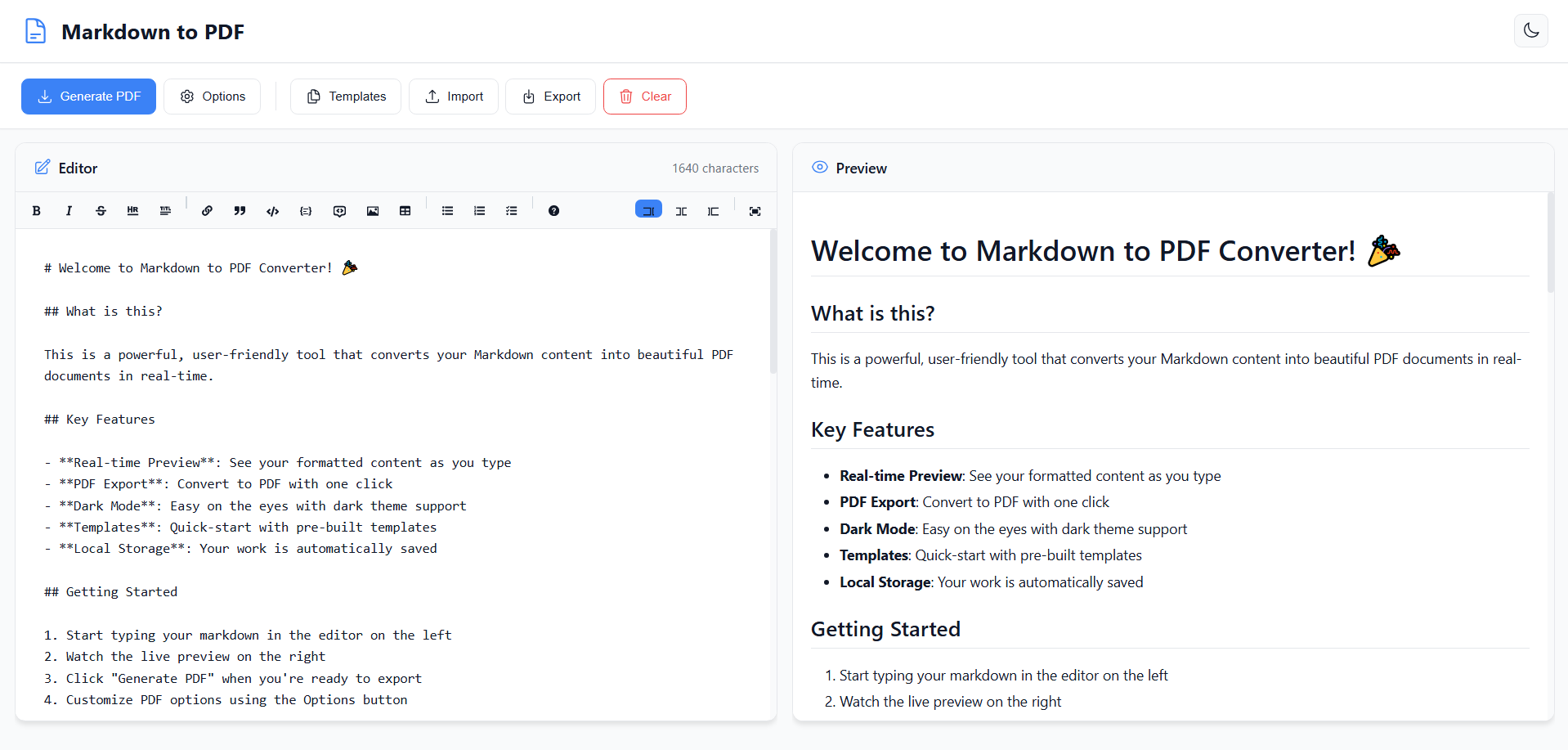
- WYSIWYG Markdown Editor with visual formatting toolbar
- Live Preview - See formatted content as you type in split-pane view
- Syntax Highlighting - Color-coded markdown syntax
- Rich Formatting Toolbar - Bold, italic, headings, lists, code, tables, and more
- Character Counter - Track document length in real-time
- One-Click PDF Export - Convert to high-quality PDF instantly
- Customizable PDF Options:
- Page Size: A4, Letter, Legal
- Orientation: Portrait or Landscape
- Adjustable Margins (0-50mm)
- Multi-Page Support - Automatic pagination for long documents
- High-Quality Output - 2x scale rendering for crisp text
- 🌓 Dark Mode - Toggle between light and dark themes
- 📱 Fully Responsive - Works seamlessly on desktop, tablet, and mobile
- 💾 Auto-Save - Content automatically saved to local storage
- 🔔 Smart Notifications - User feedback for all actions
- ⚡ Fast Performance - Optimized for smooth real-time updates
- 6 Pre-built Templates:
- Welcome Guide
- Project Documentation
- Meeting Notes
- Resume/CV
- Blog Post
- Blank Document
- 📂 Import/Export - Support for .md and .txt file import
- 💾 Export as Markdown - Save your work as .md files
- 🗑️ Smart Clear - Clear content with confirmation dialog
- Client-Side Only - All processing happens in your browser
- No Data Sent - Your content never leaves your device
- HTML Sanitization - XSS protection with rehype-sanitize
- Safe External Links - All links open securely in new tabs
Supports all standard Markdown features plus GitHub Flavored Markdown:
- Headings (H1-H6)
- Bold, Italic,
Strikethrough - Lists (ordered, unordered, task lists)
- Links and Images
- Inline
codeand code blocks with syntax highlighting - Blockquotes
- Tables
- Horizontal rules
- And more!
- Node.js v14 or higher
- npm v6 or higher (or yarn)
-
Navigate to the project directory:
cd "Markdown to Pdf"
-
Install dependencies:
npm install
-
Start the development server:
npm start
-
Open your browser:
The application will automatically open at http://localhost:3000
-
Write Your Content
- Use the WYSIWYG editor on the left with the formatting toolbar
- Or type Markdown syntax directly (e.g.,
**bold**,# Heading) - See live formatting in the editor and final preview on the right
-
Format Your Text
- Using Toolbar: Click buttons for instant formatting
- Keyboard Shortcuts:
Ctrl/Cmd + B- BoldCtrl/Cmd + I- ItalicCtrl/Cmd + K- Insert Link
- Type Markdown: Direct syntax input also works
-
Customize PDF Settings
- Click "Options" button in the toolbar
- Choose your preferred:
- Page Size (A4, Letter, Legal)
- Orientation (Portrait or Landscape)
- Margins (in millimeters)
- Click "Save Options"
-
Generate Your PDF
- Click "Generate PDF" button
- Wait for processing (loading indicator will show)
- PDF downloads automatically with timestamp
- Click "Templates" button
- Browse available templates:
- Welcome Guide - Introduction to the app
- Project Documentation - Technical documentation template
- Meeting Notes - Structured meeting notes
- Resume/CV - Professional resume template
- Blog Post - Article/blog post template
- Blank Document - Start fresh
- Click any template to load it instantly
Import Markdown File:
- Click "Import" button
- Select a
.mdor.txtfile - Content loads into the editor
Export as Markdown:
- Click "Export" button
- File downloads as
document.md
- Click the 🌙/☀️ icon in the header
- Theme persists across browser sessions
- Both editor and preview adapt to the theme
- React 18.2.0 - UI framework with Hooks
- JavaScript (ES6+) - Modern JavaScript features
- @uiw/react-md-editor - WYSIWYG markdown editor with toolbar
- react-markdown - Markdown to React component renderer
- remark-gfm - GitHub Flavored Markdown support
- rehype-raw - Raw HTML support in markdown
- rehype-sanitize - XSS protection and HTML sanitization
- jsPDF - PDF document creation
- html2canvas - HTML to canvas conversion for high-quality rendering
- @heroicons/react - Beautiful SVG icons
- CSS Variables - Dynamic theming support
- CSS Grid & Flexbox - Responsive layout
Markdown to Pdf/
├── public/
│   ├── index.html          # HTML template
│   └── _redirects          # Netlify redirects
├── src/
│   ├── components/
│   │   ├── Header.js       # App header with theme toggle
│   │   ├── Header.css
│   │   ├── Editor.js       # WYSIWYG markdown editor
│   │   ├── Editor.css
│   │   ├── EditorOverride.css  # Critical editor styles
│   │   ├── Preview.js      # Live markdown preview
│   │   ├── Preview.css
│   │   ├── Controls.js     # Action buttons toolbar
│   │   ├── Controls.css
│   │   ├── TemplateModal.js    # Template selection modal
│   │   ├── TemplateModal.css
│   │   ├── PDFOptionsModal.js  # PDF settings modal
│   │   └── PDFOptionsModal.css
│   ├── utils/
│   │   ├── pdfGenerator.js     # PDF generation logic
│   │   └── templates.js        # Pre-built templates
│   ├── App.js              # Main application component
│   ├── App.css
│   ├── index.js            # React entry point
│   └── index.css           # Global styles & theme variables
├── netlify.toml            # Netlify deployment config
├── package.json            # Dependencies and scripts
├── DEPLOYMENT.md           # Deployment guide
├── WYSIWYG_GUIDE.md       # Editor usage guide
├── PROJECT_SUMMARY.md      # Detailed project overview
├── QUICK_START.md          # Quick start guide
└── README.md               # This file
Edit src/utils/templates.js:
export const SAMPLE_TEMPLATES = [
  // ... existing templates
  {
    name: 'Your Template Name',
    description: 'Brief description of the template',
    content: `# Your Markdown Content

Your template content here...`
  }
];Edit src/index.css to change theme colors:
:root {
  --accent-color: #3b82f6;  /* Primary blue */
  --bg-primary: #ffffff;     /* Background */
  --text-primary: #111827;   /* Text color */
  /* ... more variables */
}Edit src/App.js:
const [pdfOptions, setPdfOptions] = useState({
  pageSize: 'a4',        // 'a4', 'letter', or 'legal'
  orientation: 'portrait', // 'portrait' or 'landscape'
  margin: 20             // Margin in millimeters
});npm run buildCreates an optimized production build in the build/ directory.
- Run
npm run build - Go to app.netlify.com/drop
- Drag the
buildfolder onto the page - Done! ✨
npm install -g netlify-cli
npm run build
netlify login
netlify deploy --prod- Push your code to GitHub
- Connect repository to Netlify
- Build settings are pre-configured in
netlify.toml - Automatic deployments on every push
See DEPLOYMENT.md for detailed deployment instructions.
The app can be deployed to any static hosting service:
- Vercel:
vercel --prod - GitHub Pages: Configure in repository settings
- Firebase Hosting:
firebase deploy - AWS S3: Upload build folder to S3 bucket
| Button | Function | Shortcut |
|---|---|---|
| B | Bold text | Ctrl/Cmd + B |
| I | Italic text | Ctrl/Cmd + I |
| Strikethrough | - | |
| H1-H6 | Heading levels | - |
| • | Unordered list | - |
| 1. | Ordered list | - |
| ☑ | Task list | - |
<> |
Code block | Ctrl/Cmd + Shift + C |
| " | Quote block | - |
| 🔗 | Insert link | Ctrl/Cmd + K |
| 🖼️ | Insert image | - |
| ⊞ | Insert table | - |
| ― | Horizontal rule | - |
Ctrl/Cmd + B- BoldCtrl/Cmd + I- ItalicCtrl/Cmd + K- Insert LinkCtrl/Cmd + Z- UndoCtrl/Cmd + Y- RedoTab- Indent listShift + Tab- Outdent list
1. Port 3000 Already in Use
# Use a different port
PORT=3001 npm start
2. PDF Generation Fails
- Ensure content is fully loaded in preview
- Try with simpler content first
- Check browser console for errors
- Hard refresh:
Ctrl+Shift+R
3. Dark Mode Not Working
- Hard refresh the browser
- Check if local storage is enabled
- Clear browser cache
4. Import Not Working
- Ensure file is
.mdor.txt - Check file encoding (UTF-8 required)
- Try with a smaller file first
5. Content Not Saving
- Enable local storage in browser
- Disable private/incognito mode
- Check browser storage quota
Tested and working on:
- ✅ Chrome (latest)
- ✅ Firefox (latest)
- ✅ Safari (latest)
- ✅ Edge (latest)
- ✅ Mobile browsers (iOS Safari, Chrome Mobile)
- Bundle Size: ~500KB gzipped
- Initial Load: < 3 seconds on 3G
- PDF Generation: 1-3 seconds for typical documents
- Real-time Preview: < 100ms latency
- ✅ 100% Client-Side - All processing in browser
- ✅ No Data Collection - Zero tracking or analytics
- ✅ No External Requests - Content never leaves your device
- ✅ XSS Protection - HTML sanitization enabled
- ✅ Safe Links - All external links open securely
- ✅ Local Storage Only - Data stored only on your device
Contributions are welcome! Here's how you can help:
- Fork the repository
- Create a feature branch
git checkout -b feature/amazing-feature
- Commit your changes
git commit -m 'Add amazing feature' - Push to the branch
git push origin feature/amazing-feature
- Open a Pull Request
- Follow existing code style
- Add comments for complex logic
- Test on multiple browsers
- Update documentation if needed
This project is licensed under the MIT License.
MIT License

Copyright (c) 2025 Markdown to PDF Converter

Permission is hereby granted, free of charge, to any person obtaining a copy
of this software and associated documentation files (the "Software"), to deal
in the Software without restriction, including without limitation the rights
to use, copy, modify, merge, publish, distribute, sublicense, and/or sell
copies of the Software, and to permit persons to whom the Software is
furnished to do so, subject to the following conditions:

The above copyright notice and this permission notice shall be included in all
copies or substantial portions of the Software.

THE SOFTWARE IS PROVIDED "AS IS", WITHOUT WARRANTY OF ANY KIND, EXPRESS OR
IMPLIED, INCLUDING BUT NOT LIMITED TO THE WARRANTIES OF MERCHANTABILITY,
FITNESS FOR A PARTICULAR PURPOSE AND NONINFRINGEMENT. IN NO EVENT SHALL THE
AUTHORS OR COPYRIGHT HOLDERS BE LIABLE FOR ANY CLAIM, DAMAGES OR OTHER
LIABILITY, WHETHER IN AN ACTION OF CONTRACT, TORT OR OTHERWISE, ARISING FROM,
OUT OF OR IN CONNECTION WITH THE SOFTWARE OR THE USE OR OTHER DEALINGS IN THE
SOFTWARE.
Built with these amazing open-source projects:
- React - UI framework
- @uiw/react-md-editor - WYSIWYG editor
- react-markdown - Markdown renderer
- jsPDF - PDF generation
- html2canvas - HTML to canvas
- Heroicons - Beautiful icons
- 🐛 Bug Reports: Open an issue on GitHub
- 💡 Feature Requests: Open an issue with the "enhancement" label
- 📧 Contact: Create a discussion on GitHub
- ⭐ Show Support: Star the repository if you find it useful!
- Syntax highlighting for code blocks in PDF
- Custom CSS injection for PDF styling
- Export to DOCX and HTML
- Collaborative editing support
- Cloud storage integration (Google Drive, Dropbox)
- Markdown cheat sheet sidebar
- Version history and undo system
- Word count and reading time
- Spell checker integration
- Multi-language support
- Files: 25+ source files
- Lines of Code: 2000+
- Components: 8 React components
- Templates: 6 pre-built templates
- Dependencies: 18 npm packages
- Features: 30+ features implemented
npm start       # Start development server
npm run build   # Build for production
npm test        # Run tests
npm run eject # Eject from Create React App (one-way operation)No environment variables required! Everything works out of the box.
Want to learn more about the technologies used?
Happy writing and PDF generating! 🚀
If you find this project useful, please consider:
- ⭐ Starring the repository
- 🐛 Reporting bugs
- 💡 Suggesting features
- 🤝 Contributing code
- 📢 Sharing with others
Last Updated: October 29, 2025