██████╗  █████╗ ███╗   ██╗ ██████╗ ███████╗███╗   ██╗
██╔══██╗██╔══██╗████╗  ██║██╔════╝ ██╔════╝████╗  ██║
██████╔╝███████║██╔██╗ ██║██║  ███╗█████╗  ██╔██╗ ██║
██╔══██╗██╔══██║██║╚██╗██║██║   ██║██╔══╝  ██║╚██╗██║
██████╔╝██║  ██║██║ ╚████║╚██████╔╝███████╗██║ ╚████║
╚═════╝ ╚═╝  ╚═╝╚═╝  ╚═══╝ ╚═════╝ ╚══════╝╚═╝  ╚═══╝

v2.0 — Premium ASCII rendering engine.



👆 Click the picture below to watch the demo (redirects to YouTube)
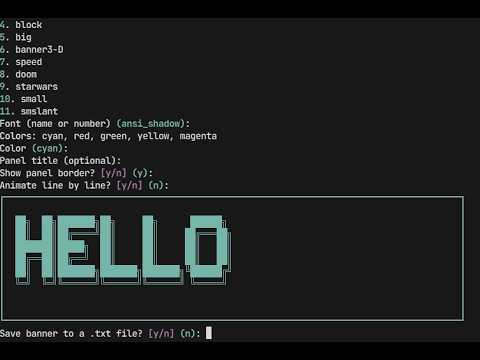
Bangen is a colorful, animated terminal banner generator built on pyfiglet and rich. Type a word, pick a font and a color, and watch your terminal come alive with big bold ASCII art — optionally animated, optionally saved.
No config files. No setup ceremony. Just run and render.
| Feature | Description |
|---|---|
| 🖋️ Multiple Fonts | Choose from a curated preset list or type any pyfiglet font name |
| 🌈 Five Colors | cyan · red · green · yellow · magenta |
| 📦 Panel Display | Clean bordered panel with optional title via rich |
| 🎞️ Line Animation | Optional line-by-line reveal for dramatic effect |
| 💾 Save to File | Export your banner to a .txt file instantly |
| 💬 Interactive Prompts | Clear, guided terminal UI — no arguments needed |
- 🐍 Python 3.9+
# Clone the repo
git clone https://github.com/pro-grammer-SD/bangen.git
cd bangen
python -m venv .venv && source .venv/bin/activate
pip install -e .
# With image export support:
pip install -e ".[images]"bangenLaunches a full-screen split-panel TUI:
- Left panel — controls: text, font, gradient, effects, speed, amplitude
- Right panel — live animated preview
↑↓navigate ·←→adjust ·Enteredit/toggle ·ssave preset ·qquit
# Basic render
bangen "HELLO"

# Custom font and gradient
bangen "HELLO" --font slant --gradient "#ff00ff:#00ffff"

# Multi-stop gradient (vertical)
bangen "HELLO" --gradient "#ff0000:#ffff00:#00ff00" --gradient-dir vertical

# Apply effects
bangen "HELLO" --effect wave --effect pulse --speed 1.5 --amplitude 2.0

# Use a built-in preset
bangen --preset neon_wave "HELLO"
bangen --preset cyberpunk "HACK THE PLANET"
bangen --preset matrix "LOADING"

# AI-driven styling
bangen "HELLO" --ai "cyberpunk neon hacker vibe"
bangen "HELLO" --ai "retro arcade 80s pixel"

# Animated terminal output
bangen "HELLO" --effect wave --animate --animate-duration 8

# Export
bangen "HELLO" --export-txt banner.txt
bangen "HELLO" --export-html banner.html --gradient "#ff00ff:#00ffff"
bangen "HELLO" --export-png banner.png --gradient "#ff0000:#ff8800:#ffff00"
bangen "HELLO" --effect pulse --export-gif banner.gif --gif-duration 3 --gif-fps 20

# Save / list presets
bangen "HELLO" --font doom --gradient "#ff6600:#ffcc00" --save-preset my_retro
bangen --list-presets
bangen --list-fonts

# Pipeline-friendly (no border)
bangen "DEPLOY" --no-border --static | catbangen/
├── 🐍 bangen.py # Main application
├── 📦 pyproject.toml # Packaging + dependencies
├── 📄 LICENSE # MIT license
├── 🙈 .gitignore # Python defaults
├── 💁♂️ README.md # Project information
├── 🌟 demo.mp4 # A demonstration of the app
└── 📸 screenshot.png # A screenshot of the app
Gradients are colon-separated hex colour stops:
"#ff0000:#ffff00:#00ff00"   # red → yellow → green (3 stops)
"#ff00ff:#00ffff"           # magenta → cyan (2 stops)
Horizontal (default) varies colour left-to-right per line.
Vertical (--gradient-dir vertical) varies colour top-to-bottom.
- Python 3.11+
pyfiglet,richPillow(optional — PNG/GIF export only)
MIT — see LICENSE.
Made with 🖤 and too much terminal time · programmersd21