



Run a command. Get a receipt for what changed.
RunGlass is a Linux-first CLI for commands where terminal history is not enough: AI agents, install scripts, package managers, Docker Compose, deploy scripts, CI jobs, and anything else you want an audit trail for.
runglass run --deep codex exec "fix this failing test"Terminal history shows what you ran. RunGlass shows what happened:
- files created, modified, and deleted
- stdout, stderr, exit code, duration, and timeline
- child processes and process tree
- outbound network hosts and listening ports
- Docker containers, images, volumes, networks, and published ports
- risk notes for changes worth reviewing
- HTML, Markdown, JSON, compact summaries, AI summaries, bundles, CI artifacts, and reverse-patch exports
CI/PR use case:
runglass ci --provider github --deep --output runglass-receipt -- codex exec "fix this failing test"
runglass github comment --receipt runglass-receipt/receipt.json --autoRunGlass turns one command boundary into a local receipt:
Command: codex exec "fix this failing test"
Files:   3 created, 2 modified, 0 deleted
Runtime: 7 child processes, 2 outbound hosts, 0 listening ports
Docker:  0 containers, 0 images, 0 volumes
Risk:    low
Exports: receipt.html, receipt.md, receipt.json, summary.md, ai-summary.txt
Supported receipts can also preview and apply file reverts when RunGlass has stored the needed before-run snapshots.
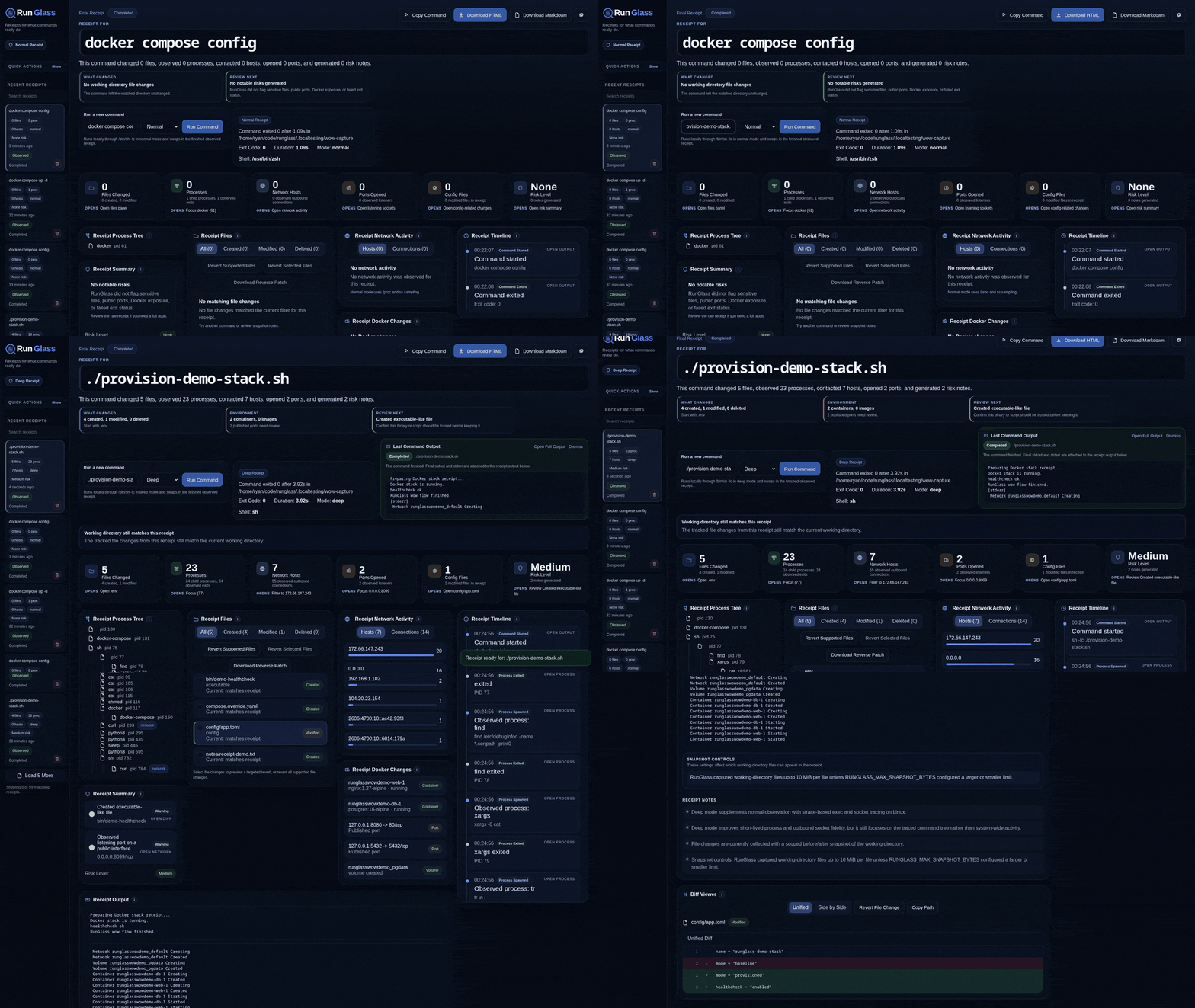
This full-stack demo wraps a provisioning command and shows the resulting file changes, processes, network activity, Docker changes, timeline, risk notes, and revert/export controls in one receipt.
More examples:
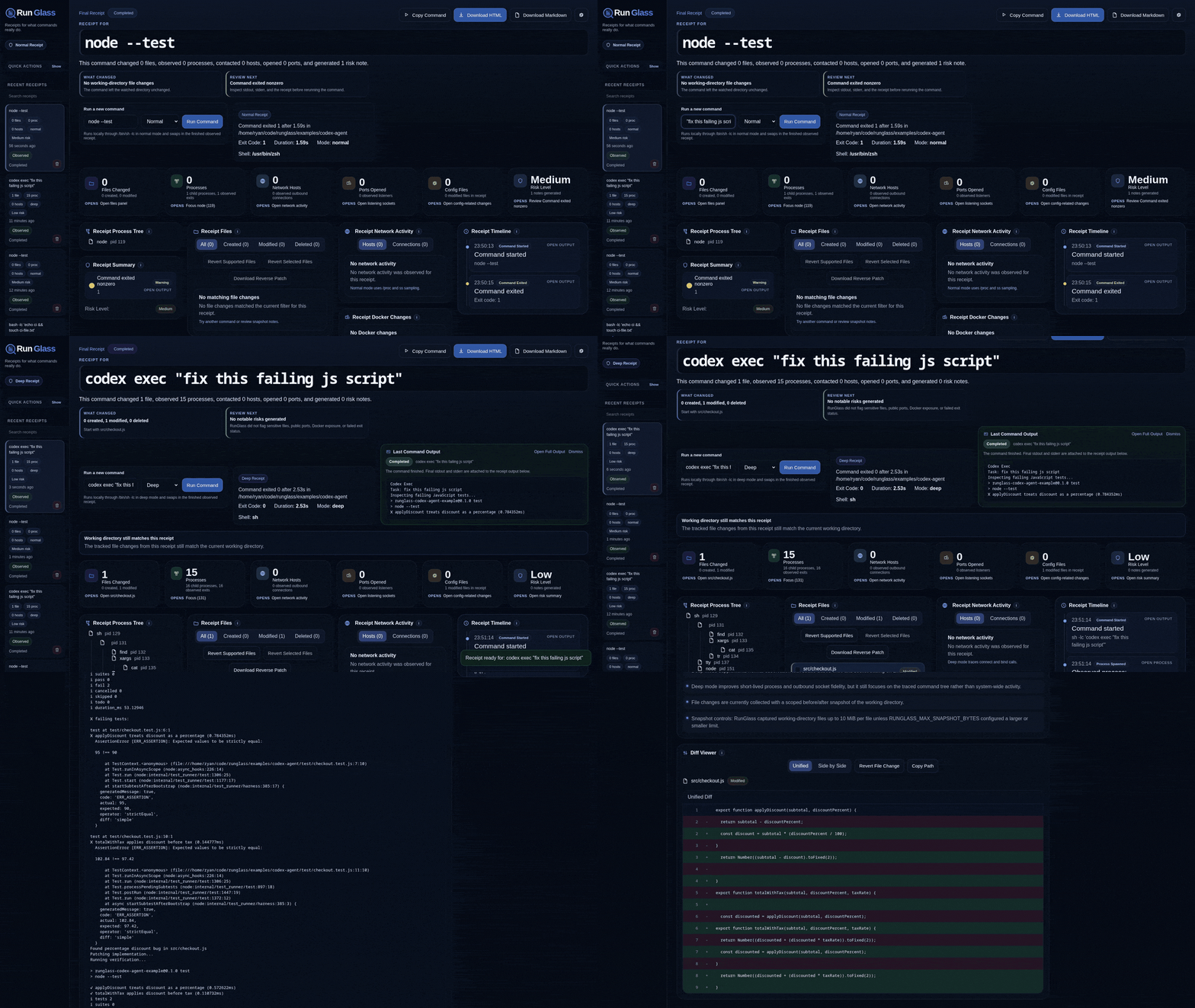
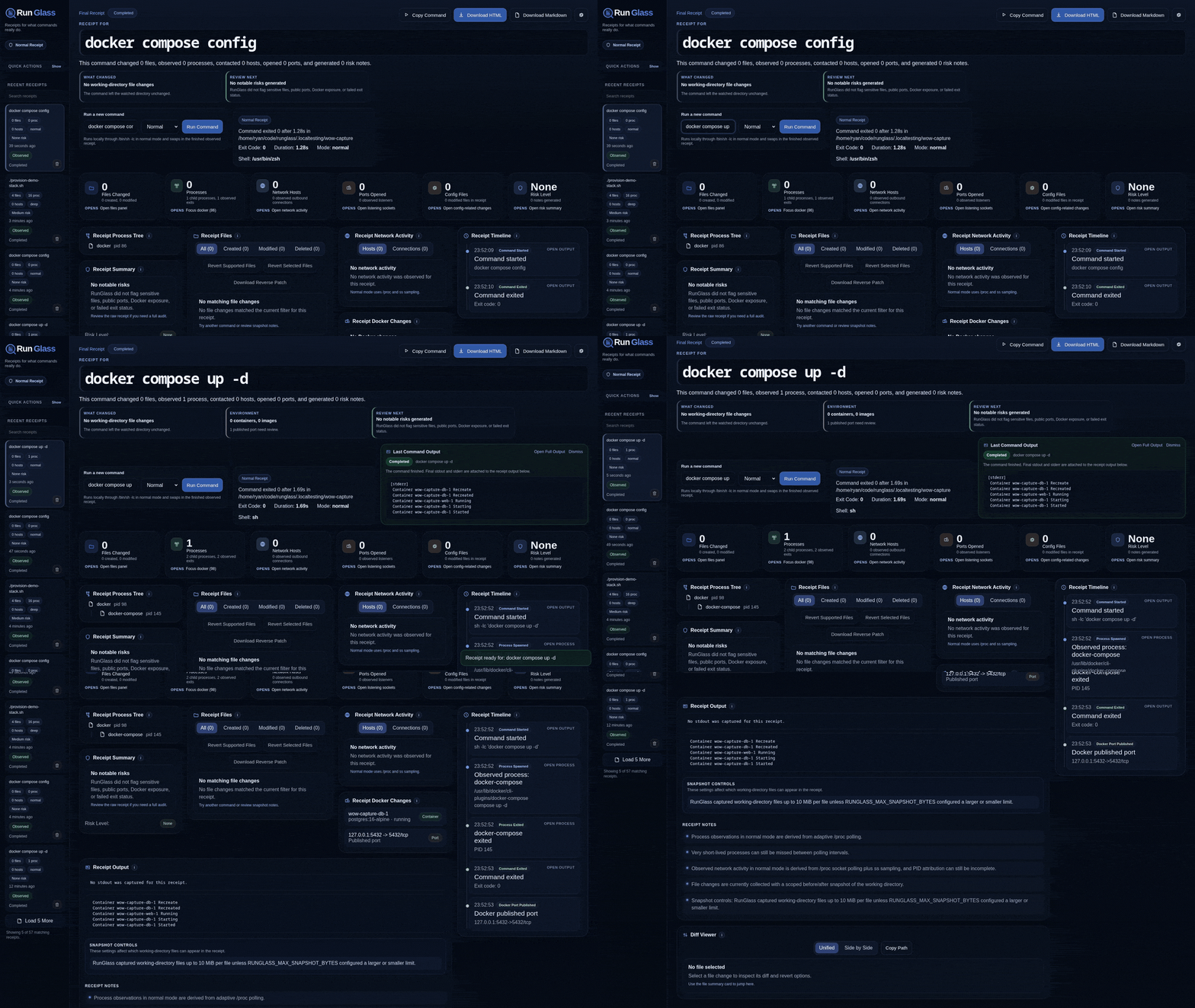
RunGlass is Linux-first for live command observation. normal mode uses Linux process and socket sources, and deep mode uses strace when available. macOS can build the CLI and inspect/export/validate existing receipts, but runglass run and runglass ci are not supported there yet.
Install from crates.io:
cargo install runglass --lockedPrebuilt release archives are published from tagged GitHub releases and include SHA-256 checksum files:
runglass-<version>-x86_64-unknown-linux-gnu.tar.gz
runglass-<version>-x86_64-unknown-linux-gnu.tar.gz.sha256
runglass-<version>-<macos-host>-apple-darwin.tar.gz
runglass-<version>-<macos-host>-apple-darwin.tar.gz.sha256
The macOS archive is for receipt inspection workflows only in this release; live command observation still exits with a clear Linux-first message.
For local development, install this checkout into your Cargo bin directory:
source "$HOME/.cargo/env"
cargo install --path crates/runglass-cli --locked
Or build without installing:
source "$HOME/.cargo/env"
cargo build
normal mode is a single-binary experience. The embedded web UI, local server, collectors, exports, and revert flow ship inside the Rust runglass binary.
deep mode is still the same binary, but on Linux it uses strace when available for better short-lived process and socket visibility.
| Platform | Install/build | Inspect/export/validate | Live command observation |
|---|---|---|---|
| Linux x86_64 | Supported, release archive available | Supported | Supported. normal uses /proc and socket sampling; deep can use strace. |
| Linux other architectures | Expected to build from crates.io/source | Supported | Expected when Linux collector tools are available. |
| macOS | Experimental build and release archive | Supported for existing receipts | Not supported yet; runglass run and runglass ci exit clearly. |
| Windows | Not supported | Not supported | Not supported. |
See Platform Support for the current support boundary.
Run a command:
runglass run npm installOpen the receipt:
runglass openUse deep mode when you want stronger process and network fidelity:
runglass run --deep docker compose up -dWrap an AI agent command:
runglass run --deep codex exec "fix this failing test"Terminal history shows what you ran.
RunGlass shows what happened.
That matters when a command can create files, edit config, pull images, open ports, phone home, spawn child processes, or leave behind state that is easy to miss.
RunGlass is strongest when one command has one clear boundary:
runglass run -- codex exec "fix this failing test"runglass run codex exec "fix this failing test"runglass run -- docker compose up -drunglass run docker compose up -drunglass run -- npm installrunglass run -- ./install.shrunglass run -- ./deploy-preview.sh
The repository includes repeatable workloads under examples, but they are support material. RunGlass itself is meant to wrap your real commands.
Export the latest receipt:
runglass export latest --html
runglass export latest --markdown
runglass export latest --json
runglass export latest --reverse-patch
runglass export latest --bundle
runglass export latest --format summary-md
runglass export latest --format ai
Preview and apply supported file reverts:
runglass revert latest --preview
runglass revert latest --apply
runglass revert latest --apply --skip-changed
runglass open
The web UI can preview file reverts, warn when files changed after the receipt ended, and apply supported reversions.
RunGlass reverts supported file changes from a receipt. It compares the current workspace to the receipt's recorded after-state before writing anything.
It can:
- restore modified files when stored before-run snapshots are available
- delete files that were created by the wrapped command and have not changed since
- restore files that were deleted by the wrapped command when stored before-run snapshots are available
- skip or force files that changed after the receipt finished
It does not automatically roll back non-file side effects such as Docker changes, network calls, external database writes, package manager global changes, external service mutations, or commands run outside the watched working directory.
RunGlass still helps with those side effects by showing the observed Docker before/after state, outbound hosts, listening ports, process activity, command output, and risk notes. For example, a receipt can show which containers, images, volumes, networks, or ports appeared during a command so you can decide on the right cleanup action deliberately.
Bundle exports are portable tar archives named runglass-receipt-<id>.tar with a runglass-receipt-<id>/ directory containing receipt.html, receipt.md, summary.md, ai-summary.txt, receipt.json, reverse.patch, and an artifacts/ folder.
Use compact summaries when the full HTML receipt is too much for a PR comment, CI log, issue report, or AI-agent feedback loop:
runglass export latest --format summary-md
runglass report latest --ai
runglass export latest --format ai
summary-md is a short Markdown report with impact counts and review-next items. ai is a deterministic text block designed to paste back into a coding agent without dumping full logs by default.
Example agent workflow:
runglass run -- codex exec "fix this failing test"
runglass export latest --format aiRunGlass works with GitHub pull requests and GitHub Actions. It can post or update one compact receipt summary on a pull request:
runglass github detect
runglass github comment --receipt latest --repo error311/runglass --pr 123 --dry-run
runglass github comment --receipt latest --repo error311/runglass --pr 123
In GitHub Actions pull-request workflows, use --auto with the CI receipt JSON to infer the repository, PR number, commit SHA, and run URL:
runglass github comment --receipt runglass-receipt/receipt.json --autoAuthentication is read from GITHUB_TOKEN, GH_TOKEN, or gh auth token. RunGlass does not accept GitHub tokens as CLI arguments, so tokens do not need to appear in shell history or process listings. Tokens are not written into receipt artifacts. The GitHub token needs permission to write issue or pull request comments.
The local web UI also includes a guarded GitHub PR receipt helper for saved receipts. It can preview the exact PR comment, copy local/CI commands, copy a GitHub Actions workflow snippet, and post or update the PR comment after explicit confirmation. Tokens are still resolved server-side only; the browser never asks for or stores a GitHub token.
See GitHub integration docs for workflow examples, API behavior, and token permissions.
Use runglass ci when an agent, install script, or remote runner should leave reviewable artifacts behind:
runglass ci --provider github --deep --output runglass-receipt -- codex exec "fix this failing test"The command writes a stable receipt directory with receipt.html, receipt.md, receipt.json, summary.md, ai-summary.txt, reverse.patch, bundle.tar, stdout/stderr captures, metadata, diffs, and file snapshots when available. In CI mode, RunGlass returns the wrapped command's exit code after artifacts are written, so failing commands still fail the job while keeping the receipt available.
In GitHub Actions, runglass ci --provider github appends the compact Markdown summary to $GITHUB_STEP_SUMMARY when that file is available. Upload the output directory as an artifact, then comment on the PR from the generated receipt.json:
- run: runglass ci --provider github --output runglass-receipt -- npm test
- uses: actions/upload-artifact@v4
  if: always()
  with:
    name: runglass-receipt
    path: runglass-receipt/
- run: runglass github comment --receipt runglass-receipt/receipt.json --auto
  if: always() && github.event_name == 'pull_request'
  env:
    GITHUB_TOKEN: ${{ github.token }}
Starter workflows are included for GitHub Actions and GitLab CI. See CI receipt workflows for the full artifact layout and local smoke test.
RunGlass also dogfoods this workflow in its own repository: pull requests run cargo test --workspace --locked through runglass ci, upload the generated receipt artifact, and update the RunGlass PR comment when token permissions allow it.
RunGlass currently supports two Linux observation modes:
normal: adaptive/procpolling plussssampling. Fast, lightweight, and dependency-light.deep: normal mode plusstrace-based exec and socket tracing for better short-lived process and outbound network visibility.
Docker changes are captured from Docker Engine before/after state. File changes are captured from a scoped working-directory snapshot and diff.
RunGlass is explicit about collector confidence:
| Area | Confidence | Notes |
|---|---|---|
| Files | High | Scoped before/after snapshot of the watched working directory, subject to snapshot size limits and ignore rules. |
| Docker | High when available | Before/after Docker Engine diff when Docker can be reached. |
| Processes | Medium in normal, higher in deep | Normal mode uses adaptive /proc polling. Deep mode adds strace for command-tree exec visibility. |
| Network | Best effort in normal, higher in deep | Normal mode combines /proc socket polling and ss; deep mode adds strace socket tracing. Attribution can still be incomplete. |
Validate a saved receipt or CI artifact directory:
runglass validate latest
runglass validate runglass-receipt/receipt.json
runglass validate runglass-receipt/
validate treats malformed receipt JSON as an error and reports missing CI artifacts or revert snapshots as warnings. It is meant to answer whether a receipt is structurally useful, not certify that RunGlass observed every system event.
See RunGlass trust model for the longer version.
RunGlass keeps one command as the unit of review:
- snapshots the working directory before and after the command
- samples Linux process and socket state while the command runs
- uses
straceindeepmode when available for better short-lived exec and socket visibility - compares Docker Engine state before and after the command
- stores stdout, stderr, JSON receipt data, export artifacts, and reversible file snapshots locally
The result is intentionally best-effort rather than magic. RunGlass is designed to answer "what changed because I ran this command?" with useful evidence, while still being clear about snapshot caps, ignored paths, platform support, and tracing limitations.
RunGlass defaults to a 10 MiB per-file snapshot cap so one large artifact does not turn a receipt into a heavy crawl.
Override the cap:
RUNGLASS_MAX_SNAPSHOT_BYTES=26214400 runglass run -- ./install.shIgnore local paths with .runglassignore:
dist/
node_modules/
*.sqlite
tmp/
secret.env
See .runglassignore.example and .env.example for starter settings.
runglass list --query docker --risk medium --mode deep
runglass open latest
runglass open <receipt-id> --port 0
runglass report latest --ai
runglass validate latest
runglass prune --keep 50 --dry-run
runglass delete latest
runglass doctor
runglass snapshot --dry-runRunGlass is for one command, one boundary, one receipt.
It is not trying to be:
- a full terminal replacement
- a multi-command shell session recorder
- perfect system-wide tracing for every event on the machine
It is a pragmatic local receipt for commands you want to understand before you trust.