



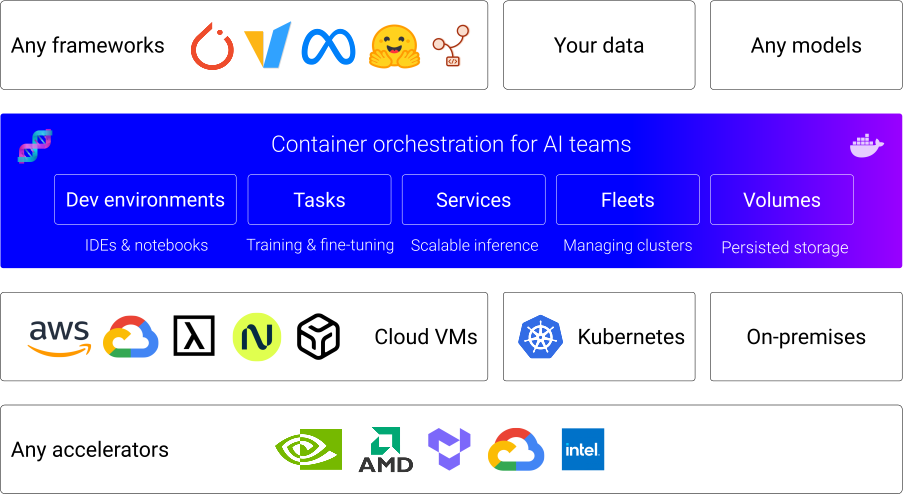
dstack is a unified control plane for GPU provisioning and orchestration that works with any GPU cloud, Kubernetes, or on-prem clusters.
It streamlines development, training, and inference, and is compatible with any hardware, open-source tools, and frameworks.
dstack supports NVIDIA, AMD, Google TPU, Intel Gaudi, and Tenstorrent accelerators out of the box.
- [2025/12] dstack 0.20.0: Fleet-first UX, Events, and more
- [2025/11] dstack 0.19.38: Routers, SGLang Model Gateway integration
- [2025/10] dstack 0.19.31: Kubernetes, GCP A4 spot
- [2025/08] dstack 0.19.26: Repos
- [2025/08] dstack 0.19.22: Service probes, GPU health-checks, Tenstorrent Galaxy
- [2025/07] dstack 0.19.21: Scheduled tasks
- [2025/07] dstack 0.19.17: Secrets, Files, Rolling deployment
Before using
dstackthrough CLI or API, set up adstackserver. If you already have a runningdstackserver, you only need to install the CLI.
To orchestrate compute across GPU clouds or Kubernetes clusters, you need to configure backends.
When using
dstackwith on-prem servers, backend configuration isn’t required. Simply create SSH fleets once the server is up.
The server can be installed on Linux, macOS, and Windows (via WSL 2). It requires Git and OpenSSH.
$ uv tool install "dstack[all]" -U
$ dstack server

Applying ~/.dstack/server/config.yml...

The admin token is "bbae0f28-d3dd-4820-bf61-8f4bb40815da"
The server is running at http://127.0.0.1:3000/
For more details on server configuration options, see the Server deployment guide.
If the CLI is not installed with the server
Once the server is up, you can access it via the dstack CLI.
The CLI can be installed on Linux, macOS, and Windows. It requires Git and OpenSSH.
$ uv tool install dstack -UTo point the CLI to the dstack server, configure it
with the server address, user token, and project name:
$ dstack project add \
    --name main \
    --url http://127.0.0.1:3000 \
    --token bbae0f28-d3dd-4820-bf61-8f4bb40815da

Configuration is updated at ~/.dstack/config.yml
Install skills to help AI agents use the dstack CLI and edit configuration files.
$ npx skills add dstackai/dstackAI agents like Claude, Codex, and Cursor can now create and manage fleets and submit workloads on your behalf.
dstack supports the following configurations:
- Fleets — for managing cloud and on-prem clusters
- Dev environments — for interactive development using a desktop IDE
- Tasks — for scheduling jobs (incl. distributed jobs) or running web apps
- Services — for deployment of models and web apps (with auto-scaling and authorization)
- Volumes — for managing persisted volumes
Configuration can be defined as YAML files within your repo.
Apply the configuration via the dstack apply CLI command, a programmatic API, or through AI agent skills.
dstack automatically manages provisioning, job queuing, auto-scaling, networking, volumes, run failures,
out-of-capacity errors, port-forwarding, and more — across clouds and on-prem clusters.
For additional information, see the following links:
You're very welcome to contribute to dstack.
Learn more about how to contribute to the project at CONTRIBUTING.md.