
A flexible, lightweight Android library to prompt users to update your app — via 16 app stores or direct APK download.




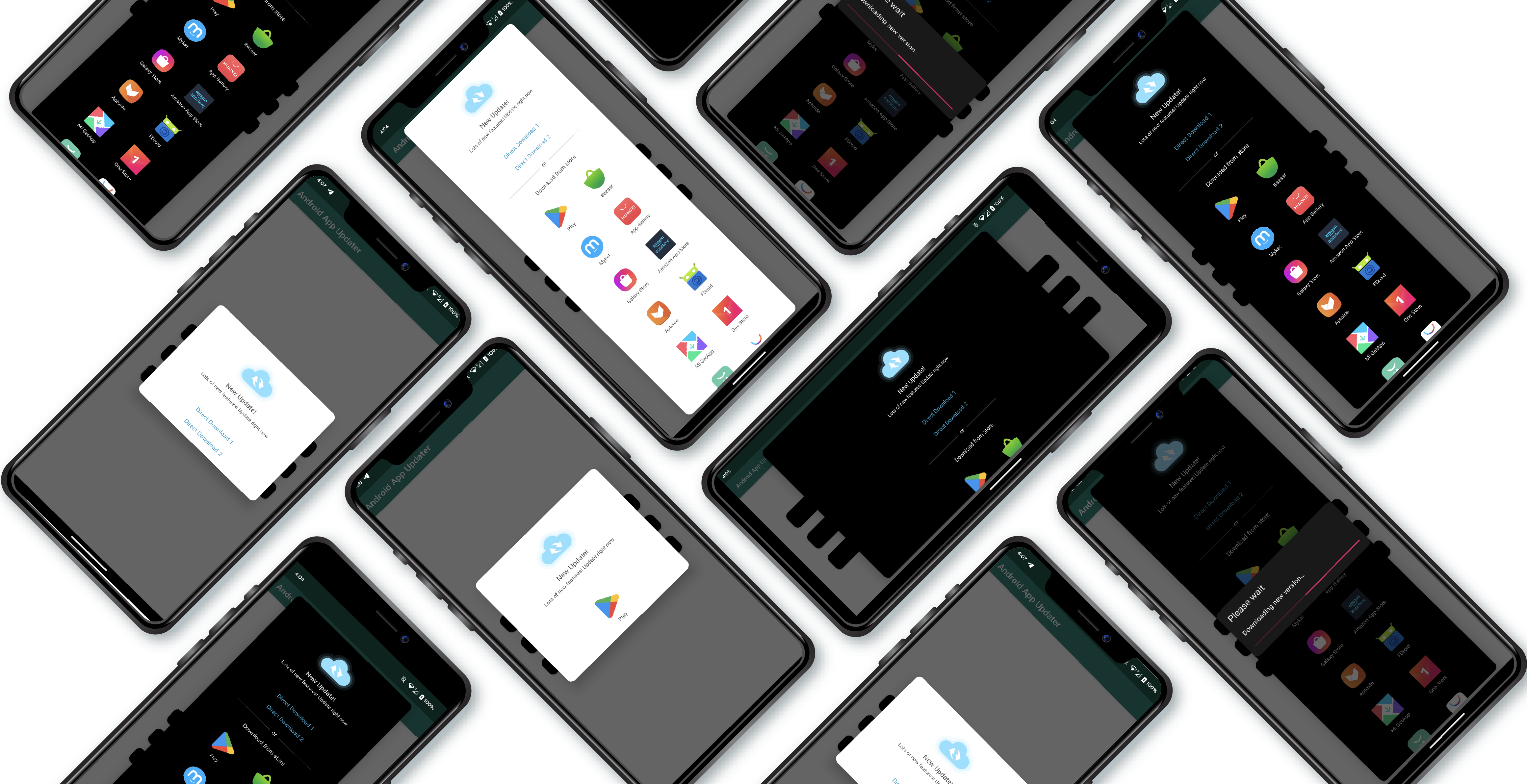
- Works with Jetpack Compose and XML Views (DialogFragment)
- Supports 16 app stores out of the box (Google Play, Huawei, Samsung, Amazon, and more)
- Direct APK download with built-in download management and installation
- Light, Dark, and System Default themes
- Force update mode (non-dismissable dialog)
- Custom typeface support
- DSL builders for clean, expressive configuration
- Built-in store icons for all supported stores
- Handles APK installation across all API levels (M through latest)
- Customizable string resources for localization
Add the dependency for the module that matches your UI toolkit:
dependencies {
    // Jetpack Compose
    implementation("com.pouyaheydari.updater:compose:latest_version")

    // XML Views / DialogFragment
    implementation("com.pouyaheydari.updater:main:latest_version")
}
Replace
latest_versionwith the latest version from Maven Central.
val stores = listOf(
    StoreListItem(
        store = StoreFactory.getStore(AppStoreType.GOOGLE_PLAY, "com.your.package"),
        title = "Google Play",
        icon = R.drawable.appupdater_ic_google_play
    ),
    StoreListItem(
        store = StoreFactory.getStore(AppStoreType.HUAWEI_APP_GALLERY, "com.your.package"),
        title = "Huawei AppGallery",
        icon = R.drawable.appupdater_ic_app_gallery
    )
)Add these permissions to your AndroidManifest.xml:
<uses-permission android:name="android.permission.INTERNET" />
<uses-permission android:name="android.permission.WRITE_EXTERNAL_STORAGE" />
<uses-permission android:name="android.permission.REQUEST_INSTALL_PACKAGES" />
Then create the list:
val directLinks = listOf(
    DirectDownloadListItem(
        title = "Direct Download",
        url = "https://example.com/your-app.apk"
    )
)var showDialog by remember { mutableStateOf(true) }
if (showDialog) {
AndroidAppUpdater(
dialogData = UpdaterDialogData(
dialogTitle = "New Update Available!",
dialogDescription = "We've added new features and fixed bugs.",
dividerText = "or",
storeList = stores,
directDownloadList = directLinks,
onDismissRequested = { showDialog = false },
theme = Theme.SYSTEM_DEFAULT
)
)
}AppUpdaterDialog.getInstance(
UpdaterDialogData(
title = "New Update Available!",
description = "We've added new features and fixed bugs.",
storeList = stores,
directDownloadList = directLinks,
isForceUpdate = false,
theme = Theme.LIGHT
)
).show(supportFragmentManager, "updater")Both Compose and Fragment APIs offer Kotlin DSL builders for a more expressive syntax.
updateDialogBuilder {
    title = "New Update Available!"
    description = "We've added new features and fixed bugs."
    isForceUpdate = false
    theme = Theme.DARK
    storeList = listOf(
        store {
            store = StoreFactory.getStore(AppStoreType.GOOGLE_PLAY, "com.your.package")
            title = "Google Play"
            icon = R.drawable.appupdater_ic_google_play
        }
    )
    directDownloadList = listOf(
        directDownload {
            title = "Direct Download"
            url = "https://example.com/your-app.apk"
        }
    )
    typeface = Typeface.createFromAsset(assets, "fonts/custom.ttf")
    errorWhileOpeningStoreCallback = { storeName ->
        Toast.makeText(this@MainActivity, "$storeName is not installed", Toast.LENGTH_SHORT).show()
    }
}.show(supportFragmentManager, "updater")val dialogData = updaterDialogData {
dialogTitle = "New Update Available!"
dialogDescription = "We've added new features and fixed bugs."
dividerText = "or"
theme = Theme.SYSTEM_DEFAULT
storeList = listOf(
store {
store = StoreFactory.getStore(AppStoreType.GOOGLE_PLAY, "com.your.package")
title = "Google Play"
icon = R.drawable.appupdater_ic_google_play
}
)
directDownloadList = listOf(
directDownload {
title = "Direct Download"
url = "https://example.com/your-app.apk"
}
)
onDismissRequested = { /* handle dismiss */ }
errorWhileOpeningStoreCallback = { storeName -> /* handle error */ }
}
AndroidAppUpdater(dialogData)| Parameter | Type | Default | Description |
|---|---|---|---|
title |
String |
"" |
Title shown at the top of the dialog |
description |
String |
"" |
Description text below the title |
storeList |
List<StoreListItem> |
[] |
App stores to show as update options |
directDownloadList |
List<DirectDownloadListItem> |
[] |
Direct APK download links |
isForceUpdate |
Boolean |
false |
If true, the dialog cannot be dismissed |
typeface |
Typeface? |
null |
Custom typeface for dialog text |
theme |
Theme |
SYSTEM_DEFAULT |
LIGHT, DARK, or SYSTEM_DEFAULT |
errorWhileOpeningStoreCallback |
((String) -> Unit)? |
null |
Called with store name if opening fails |
| Parameter | Type | Default | Description |
|---|---|---|---|
dialogTitle |
String |
"" |
Title shown at the top of the dialog |
dialogDescription |
String |
"" |
Description text below the title |
dividerText |
String |
"" |
Text on the divider between stores and downloads |
storeList |
List<StoreListItem> |
[] |
App stores to show as update options |
directDownloadList |
List<DirectDownloadListItem> |
[] |
Direct APK download links |
onDismissRequested |
() -> Unit |
{} |
Called when the user dismisses the dialog |
typeface |
Typeface? |
null |
Custom typeface for dialog text |
theme |
Theme |
SYSTEM_DEFAULT |
LIGHT, DARK, or SYSTEM_DEFAULT |
errorWhileOpeningStoreCallback |
(String) -> Unit |
{} |
Called with store name if opening fails |
| Store | Enum Value | Built-in Icon |
|---|---|---|
| Google Play | GOOGLE_PLAY |
appupdater_ic_google_play |
| Cafe Bazaar | CAFE_BAZAAR |
appupdater_ic_bazar |
| Myket | MYKET |
appupdater_ic_myket |
| Huawei AppGallery | HUAWEI_APP_GALLERY |
appupdater_ic_app_gallery |
| Samsung Galaxy Store | SAMSUNG_GALAXY_STORE |
appupdater_ic_galaxy_store |
| Amazon App Store | AMAZON_APP_STORE |
appupdater_ic_amazon_app_store |
| Aptoide | APTOIDE |
appupdater_ic_aptoide |
| F-Droid | FDROID |
appupdater_ic_fdroid |
| Xiaomi GetApps | MI_GET_APP_STORE |
appupdater_ic_get_app_store |
| OneStore | ONE_STORE_APP_MARKET |
appupdater_ic_one_store |
| Oppo App Market | OPPO_APP_MARKET |
appupdater_ic_oppo_app_market |
| Vivo V-AppStore | V_APP_STORE |
appupdater_ic_v_app_store |
| 9Apps | NINE_APPS_STORE |
appupdater_ic_nine_apps |
| Tencent App Store | TENCENT_APPS_STORE |
appupdater_ic_tencent_app_store |
| ZTE App Center | ZTE_APP_CENTER |
appupdater_ic_zte_app_center |
| Lenovo App Center | LENOVO_APP_CENTER |
appupdater_ic_lenovo_app_center |
All icons are bundled with the library. Use them via R.drawable.appupdater_ic_*.
Pass one of the Theme enum values to control the dialog appearance:
Theme.LIGHT          // Light background, dark text
Theme.DARK           // Dark background, light text
Theme.SYSTEM_DEFAULT // Follows the device's current themeval typeface = Typeface.createFromAsset(assets, "fonts/your_font.ttf")
// Pass it to either API:
UpdaterDialogData(
// ...
typeface = typeface
)Override these in your strings.xml to localize or customize dialog text:
<string name="appupdater_please_wait">Please wait</string>
<string name="appupdater_downloading_new_version">Downloading new version...</string>
<string name="appupdater_download_notification_title">Downloading...</string>
<string name="appupdater_download_notification_desc">Downloading new version</string>
<string name="appupdater_please_install">Please install</string>
<string name="appupdater_or">or</string>
<string name="appupdater_download_from_store">Download from store</string>
<string name="appupdater_couldnt_find_downloaded_file">Couldn't find downloaded file</string>The library is split into focused modules:
AndroidAppUpdater/
├── core/             # Theme enum and shared constants (pure Kotlin)
├── store/            # Store implementations, StoreFactory, icons
├── directdownload/   # APK download via DownloadManager + installation
├── appupdater/       # Fragment/XML UI (published as "main")
├── compose/          # Jetpack Compose UI
└── app/              # Sample/demo application
| Module | Artifact | Description |
|---|---|---|
:core |
com.pouyaheydari.updater:core |
Theme enum and constants — no Android dependency |
:store |
com.pouyaheydari.updater:store |
All 16 store implementations with built-in icons |
:directdownload |
com.pouyaheydari.updater:directdownload |
Download manager, permissions, APK installation |
:appupdater |
com.pouyaheydari.updater:main |
DialogFragment-based update dialog |
:compose |
com.pouyaheydari.updater:compose |
Jetpack Compose update dialog |
| Requirement | Value |
|---|---|
| Min SDK | 23 (Android 6.0) |
| Compile SDK | 36 |
| Kotlin | 2.3+ |
| Java | 17 |
The :app module contains a fully working demo with examples for:
- Kotlin API — Direct constructor usage
- DSL API — Builder-style configuration
- Compose — Composable dialog integration
Clone the repo and run the app module to see the library in action.
Copyright 2018 Pouya Heydari

Licensed under the Apache License, Version 2.0 (the "License");
you may not use this file except in compliance with the License.
You may obtain a copy of the License at

    http://www.apache.org/licenses/LICENSE-2.0

Unless required by applicable law or agreed to in writing, software
distributed under the License is distributed on an "AS IS" BASIS,
WITHOUT WARRANTIES OR CONDITIONS OF ANY KIND, either express or implied.
See the License for the specific language governing permissions and
limitations under the License.
Library icon and design by Amir Gerdakane