

Neovim plugin for inline language injection and syntax highlighting using Tree-sitter.
- tree-sitter-language-injection.nvim
tree-sitter-language-injection.nvim automatically applies syntax highlighting to code snippets embedded as strings or comments in your code, based on inline language annotations. For example, SQL queries inside JavaScript/TypeScript strings can be highlighted as SQL if marked accordingly.
- Improved readability for embedded code (e.g. SQL, HTML in JS/TS, Python, etc.)
- Customizable for any language and annotation style
- Seamless integration with nvim-treesitter
- Inline comment annotation: Add a comment at the start of a string with the language name to enable syntax highlighting for the embedded code.
- Above-line comment annotation: Place a comment above a string/variable with the language name to trigger the injection.
- Configurable injections: Easily extend or override language injections using Lua tables and custom Tree-sitter queries.
- Built-in support: Out-of-the-box support for Python, Rust, JavaScript, and TypeScript, including common web and data languages.
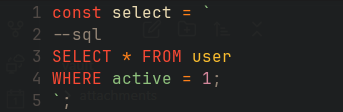
const select = `
--sql
SELECT * FROM user
WHERE active = 1
`;
Result:
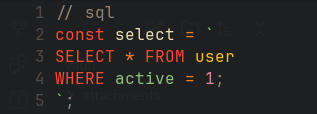
// sql
const select = `
SELECT * FROM user
WHERE active = 1
`;
Result:
You can add or override language injections by passing a table to setup. For example:
require("tree-sitter-language-injection").setup({
  javascript = {
    string = {
      langs = {
        { name = "sql", match = "^(\r\n|\r|\n)*-{2,}( )*{lang}" }
      },
      query = [[
        ; query
        ;; string {name} injection
        ((string_fragment) @injection.content
                        (#match? @injection.content "{match}")
                        (#set! injection.language "{name}"))
      ]]
    },
    comment = {
      langs = {
        { name = "sql", match = "^//+( )*{lang}( )*" }
      },
      query = [[
        ; query
        ;; comment {name} injection
        ((comment) @comment .
          (lexical_declaration
            (variable_declarator
              value: [
                (string(string_fragment)@injection.content)
                (template_string(string_fragment)@injection.content)
              ]@injection.content)
          )
          (#match? @comment "{match}")
          (#set! injection.language "{name}")
        )
      ]]
    }
  }
})
It's already built-in for many languages, but you can tinker with a language you need or create an issue and I will help if possible.
- Neovim >= 0.9.0
- nvim-treesitter must be installed and set up
use({ "dariuscorvus/tree-sitter-language-injection.nvim", after = "nvim-treesitter" }){
"dariuscorvus/tree-sitter-language-injection.nvim",
opts = {}, -- calls setup()
}require("tree-sitter-language-injection").setup()| Host Language | Comment Inline | Comment Above | Supported Embedded |
|---|---|---|---|
| Python | ✅ | ✅ | SQL, JS, TS, HTML, CSS, Python |
| Rust | ✅ | ✅ | SQL, JS, TS, HTML, CSS, Python |
| JavaScript | ✅ | ✅ | SQL, JS, TS, HTML, CSS, Python |
| TypeScript | ✅ | ✅ | SQL, JS, TS, HTML, CSS, Python |
Before configuration:

Configuring:

After configuration:

Problem:
When you open a file, injected language highlighting works as expected at first. However, after your LSP (Language Server Protocol) attaches, Neovim's semantic highlighting takes over, and the injection highlighting from this plugin disappears.
Solution:
This happens because some LSP configurations (especially with Neovim's built-in LSP client) enable semanticTokensProvider, which can override Tree-sitter-based highlights—including those provided by this plugin.
You can choose between disabling semantic highlighting or only the semantic highlighting for strings.
To fix this, you can disable semantic tokens in your LSP setup. For example, if you use nvim-lspconfig, add the following to your LSP configuration:
on_attach = function(client, bufnr)
  -- Disable semantic tokens to preserve Tree-sitter injection highlights
  client.server_capabilities.semanticTokensProvider = nil
end
You can add this to your on_attach function for the relevant language servers, or globally. After this change, your injected highlights should remain visible even after the LSP attaches.
You can automatically disable semantic highlighting for strings when any LSP attaches by placing this in your Neovim configuration:
vim.api.nvim_create_autocmd("LspAttach", {
  callback = function(args)
    -- Only clear the LSP string highlight group to preserve injection highlights
    vim.api.nvim_set_hl(0, "@lsp.type.string", {})
  end,
})
Place this in your init.lua or a relevant plugin setup file.
This ensures that the workaround is applied for every LSP client, preserving Tree-sitter injection highlights for strings without disabling all semantic tokens.
References:
If you experience other issues, please check open issues or open a new one with detailed information.
I welcome and encourage pull requests for:
- New language support (host languages)
- Additional embedded/injected languages
- Improvements to existing injections and matching
If you have a reasonable request or need help implementing new support, feel free to open an issue or pull request—I'm happy to assist!
Let's make this plugin work for as many languages and workflows as possible.
MIT
Created by DariusCorvus.