NB: As of October 2025, u-blox have discontinued both their L-Band and MQTT encrypted SPARTN correction services, so the SPARTN Client functionality is effectively redundant and may be removed in a subsequent version of PyGPSClient.
The SPARTN MQTT and L-Band configuration panels are now disabled by default, though the L-Band panel can in theory still be used for other generic L-Band modem configuration purposes and can be re-enabled by setting json configuration parameter lband_enabled_b to 1.
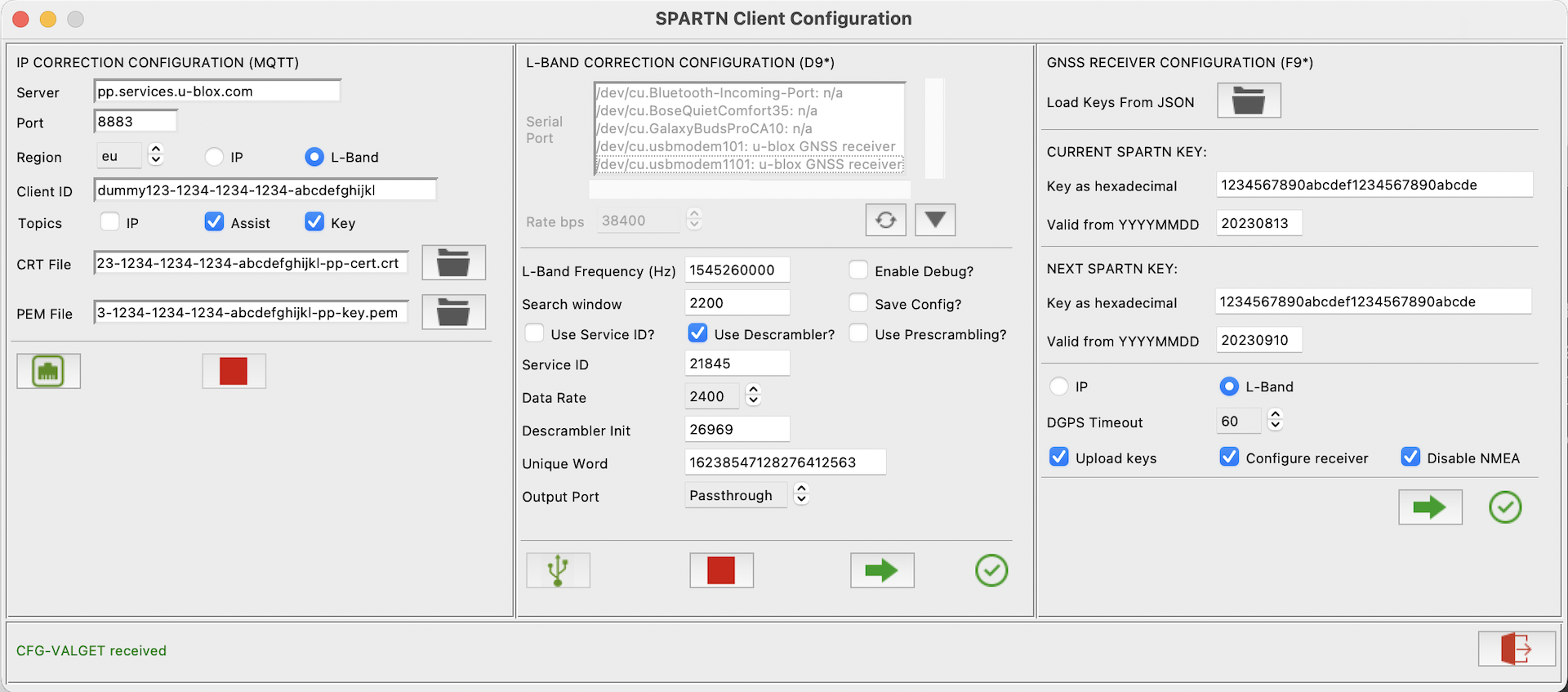
The SPARTN Configuration utility allows users to receive and process SPARTN RTK Correction data from an IP or L-Band source to achieve cm level location accuracy. It provides three independent configuration sections, one for IP Correction (MQTT), one for L-Band Correction (e.g. NEO-D9S) and a third for the GNSS receiver (e.g. ZED-F9P).
The facility can be accessed by clicking  or selecting Menu..Options..SPARTN Configuration Dialog.
Pre-Requisites:
NB: SPARTN data from proprietary subscription services like Thingstream PointPerfect (MQTT or L-Band) is encrypted. While it is not necessary for PyGPSClient to decrypt the data prior to sending it to the GNSS receiver (the receiver's own firmware will perform the necessary decryption provided the relevant keys have been uploaded), if you wish to see the decrypted data in the PyGPSClient console it will be necessary to provide current decryption keys via the spartndecode_b and spartnkey_s settings in the json configuration file. Note that these keys are typically only valid for a 4 week period and will require regular updating. See pyspartn Encrypted Payloads for further details.
-
IP Correction (MQTT Client):
- Internet access
- Subscription to a suitable MQTT SPARTN location service e.g. u-blox / Thingstream PointPerfect IP or L-band, which should provide the following details:
- Server URL e.g.
pp.services.u-blox.com - Client ID (which can be stored in the
"mqttclientid_s":json configuration file setting or via environment variableMQTTCLIENTID) - Client Certificate (
*.crt) and Client Key (*.pem) files required to access the SPARTN service via an encrypted HTTPS connection. These files can be downloaded from the Thingstream..PointPerfect..Location Things..Credentials web page. If these are placed in the user's HOME directory using the location service's standard naming convention, PyGPSClient will find them automatically. - Region code - select from
us,eu,jp,krorau. - Source - select from either
IPorL-Band(NB: the 'L-Band' MQTT mode provides decryption keys, Assist Now (ephemerides) data and L-Band frequency information, but the correction data itself arrives via the L-Band receiver below). - A list of published topics. These typically include:
/pp/ip/region- binary SPARTN correction data (SPARTN-1X-HPAC* / OCB* / GAD*) for the selected region, for IP sources only./pp/ubx/mga- UBX MGA AssistNow ephemera data for each constellation./pp/ubx/0236/ipor/pp/ubx/0236/Lb- UBX RXM-SPARTNKEY messages containing the IP or L-band decryption keys to be uploaded to the GNSS receiver./pp/frequencies/Lb- json message containing each region's L-band transmission frequency - currentlyusoreu(this is automatically enabled whenL-Bandis selected).
- Server URL e.g.
-
L-BAND Correction (D9* Receiver):
- SPARTN L-Band correction receiver e.g. u-blox NEO-D9S.
- Suitable Inmarsat L-band antenna and good satellite reception on regional frequency (NB: standard GNSS antenna may not be suitable).
- Subscription to L-Band location service e.g. u-blox / Thingstream PointPerfect, which should provide the following details:
- L-Band frequency (also available via
/pp/frequencies/LbMQTT topic) - Search window
- Use Service ID?
- Use Descrambling?
- Use Prescrambling?
- Service ID
- Data Rate
- Descrambler Init
- Unique Word
- L-Band frequency (also available via
-
GNSS Receiver:
- SPARTN-compatible GNSS receiver e.g. u-blox ZED-F9P
- Subscription to either IP and/or L-Band location service(s) e.g. e.g. u-blox / Thingstream PointPerfect, which should provide the following details:
- Current and Next IP or L-band decryption Keys in hexadecimal format. These allow the receiver to decrypt the SPARTN message payloads.
- Valid From dates in YYYYMMDD format (keys normally valid for 4 week period).
Instructions:
- Enter your MQTT Client ID (or set it up beforehand as *.json configuration setting
"mqttclientid_s":or via environment variableMQTTCLIENTID). - Select the path to the MQTT
*.crtand*.pemfiles provided by the location service (PyGPSClient will use the user's HOME directory by default). - Select the required region and subscription mode (
IPorL-Band). - Select the required topics:
- IP - this is the raw SPARTN correction data as SPARTN-1X-HPAC* / OCB* / GAD* messages (required for IP; must be unchecked for L-Band).
- Assist - this is Assist Now data as UBX MGA-* messages.
- Key - this is the SPARTN IP or L-band decryption keys as a UBX RXM-SPARTNKEY message.
- To connect to the MQTT server, click
 . To disconnect, click
  .
.


- NOTE This panel is only available if json configuration setting
lband_enabled_bis set to1. - To connect to the Correction receiver, select the receiver's port from the SPARTN dialog's Serial Port listbox and click
 . To disconnect, click .
 - Select the required Output Port - this is the port used to connect the Correction receiver to the GNSS receiver e.g. UART2 or I2C.
- If both Correction and GNSS receivers are connected to the same PyGPSClient workstation (e.g. via separate USB ports), it is possible to run the utility in Output Port = 'Passthough' mode, whereby the output data from the Correction receiver (UBX
RXM-PMPmessages) will be automatically passed through to the GNSS receiver by PyGPSClient, without the need to connect the two externally. - To enable INF-DEBUG messages, which give diagnostic information about current L-Band reception, click 'Enable Debug?'.
- To save the configuration to the device's persistent storage (Battery-backed RAM, Flash or EEPROM), click 'Save Config?'. This only has to be done once for a given region.
- Once connected, click
 to upload the configuration. The utility will send the relevant configuration command(s) to the Correction receiver and poll for an acknowledgement.


- Connect to the GNSS receiver first by clicking on the main PyGPSClient settings panel.
- If you are subscribing to the MQTT SPARTNKEY (
/pp/ubx/0236/ipor/pp/ubx/0236/Lb) topic, the decryption key and validity date details will be entered automatically on receipt of a UBX RXM-SPARTNKEY message (which may take a few seconds after connecting). Alternatively, they can be uploaded from the service provider's JSON file, or entered manually as follows: - Enter the current and next decryption keys in hexadecimal format e.g.
0102030405060708090a0b0c0d0e0f10. The keys are normally 16 bytes long, or 32 hexadecimal characters. - Enter the supplied Valid From dates in
YYYYMMDDformat. NB: These are Valid From dates rather than Expiry dates. If the location service provides Expiry dates, subtract 4 weeks from these to get the Valid From dates. - Select 'DGPS Timeout', 'Upload keys', 'Configure receiver' and 'Disable NMEA' options as required.
- Select the SPARTN correction source - either
IPorL-Band. - To reduce traffic volumes, you can choose to disable NMEA messages from the receiver. A minimal set of UBX NAV messages will be enabled in their place.
- Click to upload the configuration. The utility will send the relevant configuration command(s) to the receiver and poll for an acknowledgement.
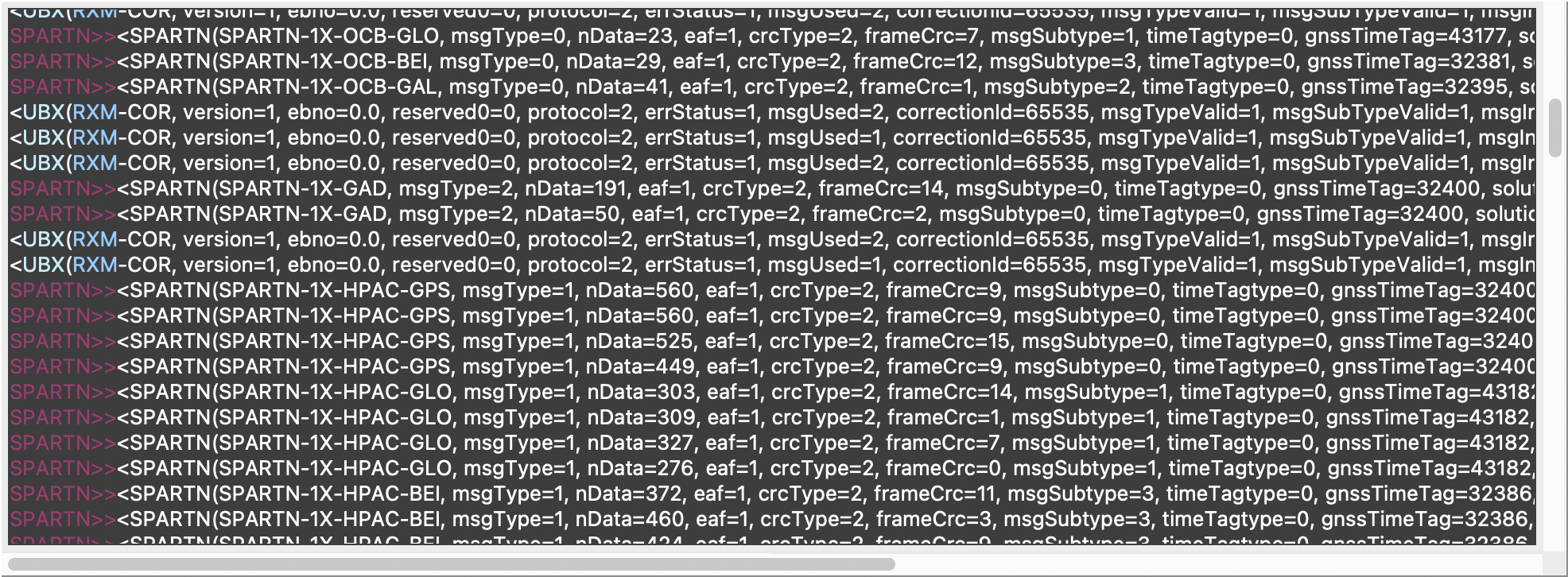
Below is a illustrative SPARTN DGPS data log, showing:
- Incoming SPARTN correction messages (SPARTN-1X-HPAC* high-precision atmosphere corrections; SPARTN-OCB* orbit / clock / bias corrections; SPARTN-1X-GAD geographic area definitions).
- Outgoing UBX RXM-COR confirmation messages from receiver showing that the SPARTN data has been received and decrypted OK.